Purple Team Lab – Detecting Lateral Movement via SMB File Transfers (T1021.002)
Building a realistic Purple Team lab to detect and respond to SMB uploads / Windows Admin Shares (T1021.002) using Wazuh, Sysmon, FIM and YARA-based Active Response.
🧱 Overview
This Purple Team lab demonstrates how to detect and respond to lateral movement via SMB / Windows Admin Shares (T1021.002) using Wazuh. The scenario covers:
- Detecting file uploads to a Windows share (SMB) using the Wazuh agent’s FIM (syscheck) and Sysmon.
- Optionally scanning newly uploaded files with YARA on the endpoint.
- Automatically triggering an Active Response (AR) that quarantines suspicious files and writes an audit log that the manager ingests.
- Proving end-to-end functionality by showing Wazuh alerts generated during the flow.
🎯 MITRE ATT&CK Technique:
Objective : catch suspicious file transfers (scripts/executables) to network shares that could be used for lateral movement or post-exploitation, enrich detection with YARA file-scanning, and contain suspicious artifacts automatically.
🧠 Why this scenario?
Lateral movement often begins with an attacker copying tools or scripts to a writable share (or admin share), for example a PowerShell script that will be executed remotely on another host. Detecting file creation on shares combined with a content scan (YARA) helps distinguish benign file drops from likely malicious uploads and enables fast containment.
Using YARA provides extra value: it can detect suspicious content patterns inside uploaded files (e.g., powershell usage, encoded payloads, known strings), reducing false positives compared to a pure path-based or FIM-only detection.
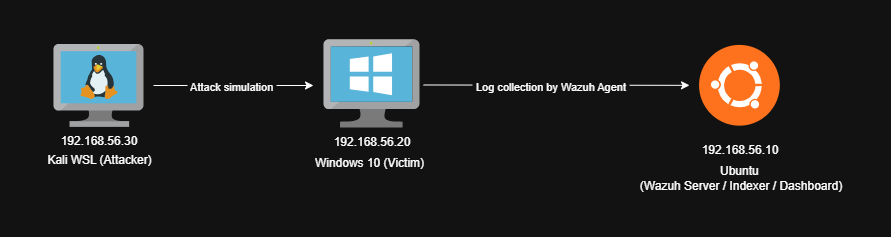
🧱 Lab Architecture
Attacker (Kali WSL) → Windows victim (Wazuh agent, SMB share C:\LabShare) → Wazuh Manager (SIEM & Active Response orchestration).
🔧 What we instrumented
- Sysmon (where useful), used to capture process & file events.
- Wazuh agent on the Windows host :
- FIM (syscheck) configured to watch
C:\LabSharein realtime. - Active Response scripts deployed under the agent active-response folder.
- FIM (syscheck) configured to watch
- YARA binary and rule set placed on the agent to scan suspicious files.
- Manager rules to :
- Trigger the AR on FIM file creation (
T1021.002) events. - Pick up YARA logs if the agent logs YARA results to
active-responses.log. - Produce an AR confirmation alert when the agent writes the AR log marker.
- Trigger the AR on FIM file creation (
⚔️ Attack simulation
Attacker (Kali / WSL) example :
1
2
3
4
5
6
7
# attacker prepares a sample PowerShell "evil" script
cat /tmp/evil_demo.ps1
# e.g. content:
# Invoke-Command -ScriptBlock { Write-Host "pwned" }

# upload to victim share
smbclient //192.168.56.20/LabShare -U labuser -c "put /tmp/evil_demo.ps1 evil_demo.ps1"
On the Windows victim the share mounts to C:\LabShare and the new file appears.
👁️ Detection logic
FIM detection, agent ossec.conf (agent-side syscheck) :
1
2
3
<syscheck>
  <directories check_all="yes" realtime="yes" report_changes="yes">C:\LabShare</directories>
</syscheck>
Manager rules :
File : /var/ossec/etc/rules/fim_LabShare.xml
1
2
3
4
5
6
7
8
9
<group name="syscheck">
  <rule id="300001" level="8">
    <if_sid>554</if_sid>
    <description>File created in LabShare (possible SMB upload)</description>
    <mitre>
      <id>T1021.002</id>
    </mitre>
  </rule>
</group>
File : /var/ossec/etc/rules/yara_and_ar.xml
1
2
3
4
5
6
7
8
9
10
11
12
13
14
15
16
17
18
19
20
21
<group name="active-response,local">
  <rule id="310001" level="12">
    <match>WAZUH_AR: SMB upload detected</match>
    <description>Containment AR executed: SMB upload detected and processed</description>
    <group>active-response,containment</group>
    <options>no_full_log</options>
  </rule>
</group>

<group name="yara,">
  <rule id="300002" level="0">
    <decoded_as>yara_decoder</decoded_as>
    <description>Yara grouping rule</description>
  </rule>

 <rule id="310002" level="12">
    <if_sid>300002</if_sid>
    <match>wazuh-yara: INFO - Scan result: </match>
    <description>[$(yara_type)] File "$(yara_scanned_file)" is a positive match. Yara rule: $(yara_rule)</description>
  </rule>
</group>
Active Response binding :
File : /var/ossec/etc/ossec.conf
1
2
3
4
5
6
7
8
9
10
11
12
<command>
  <name>yara_labshare</name>
  <executable>yara_labshare.bat</executable>
  <timeout_allowed>no</timeout_allowed>
</command>

<active-response>
  <disabled>no</disabled>
  <command>yara_labshare</command>
  <location>local</location>
  <rules_id>300001</rules_id>
</active-response>
This causes the manager to instruct the agent to run the yara_labshare.bat wrapper when the FIM rule 300001 fires.
🛠 Agent scripts
1) YARA wrapper (Windows agent : yara_labshare.bat)
Purpose : receives the JSON input from the manager (stdin), extracts the syscheck.path, runs YARA against that file and logs results to active-responses.log. If YARA matches, it invokes contain_smb.ps1 with the matched rule name and file path.
Key behavior :
- Reads manager JSON input (via PowerShell call in the .bat) to get the path of the added file.
- Runs YARA :
yara64.exe rules\lab_yara.yar <file> - Logs
wazuh-yara: INFO - Scan result: <rule> <file>would be consumed by the manager (yara_decoder). - Calls
contain_smb.ps1with two args :TargetFileandYaraRule.
The script is available here : yara_labshare.bat
2) Containment script (contain_smb.ps1)
Purpose : receive the file path and the YARA rule that matched, then quarantine the file (move to C:\Quarantine) and write a human-readable log and a JSON summary for audit.
High-level steps :
- Create logs in
C:\Program Files (x86)\ossec-agent\active-response\logs\. - If YARA rule present → move file to quarantine and mark
status = "quarantined". - If move fails → make a staged copy (for analyst).
- Write a JSON summary artifacts file
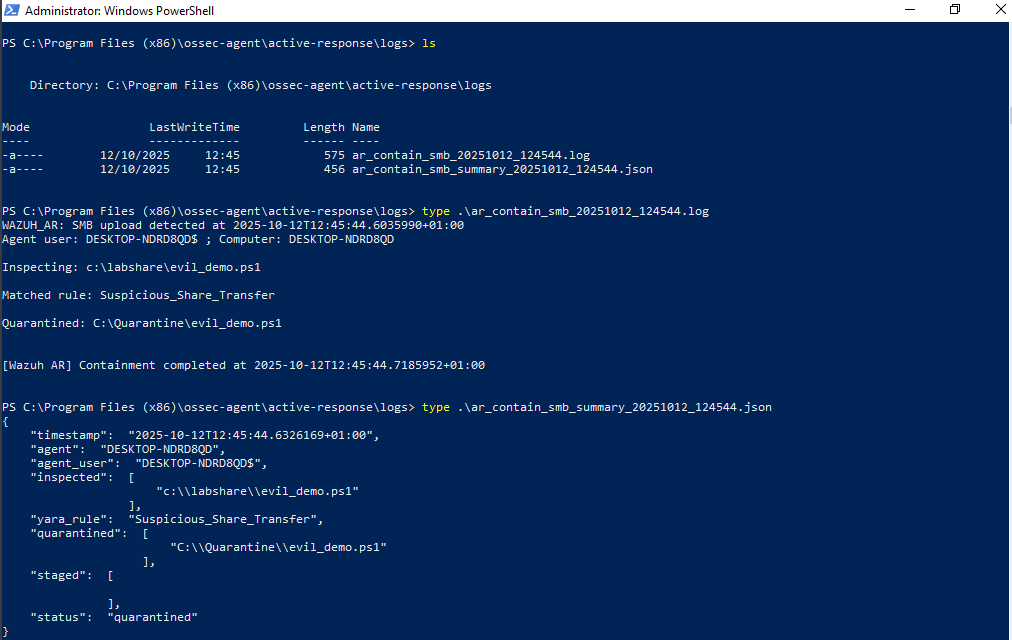
(ar_contain_smb_summary_YYYYMMDD_HHMMSS.json) and a AR log (ar_contain_smb_...log) with theWAZUH_AR: SMB upload detectedmarker so the manager can generate the AR confirmation alert.
The script is available here : contain_smb.ps1
🔎 YARA rule (lab_yara.yar)
The file conatains generic rule that matches suspicious strings often present in uploaded scripts :
File : C:\Program Files (x86)\ossec-agent\active-response\bin\yara\rules\lab_yara.yar
rule Suspicious_Share_Transfer
{
    meta:
        author = "xpwn3d"
        description = "Generic detection for suspicious scripts uploaded to SMB shares"
        reference = "T1021.002 - SMB/Windows Admin Shares"

    strings:
        $s1 = /powershell.exe/i
        $s2 = /net\s+user/i
        $s3 = /Enable-LocalUser/i
        $s4 = /Invoke-/i
        $s5 = /Base64String/i

    condition:
        any of ($s*)
}
If any of those strings appear in a file, YARA will match and output the matching rule name. That signal (rule name + file path) is logged by the .bat wrapper and re-ingested by Wazuh.
Why did I use YARA here?
- FIM alone detects that a file was created, but not whether the content is suspicious.
- YARA lets you check file contents for known malicious patterns (scripting usage, encoded payloads, admin-control patterns) and reduces the number of manual investigations.
- It’s especially useful for catching scripts/executables that would otherwise look benign by name but contain obvious malicious instructions.
- It’s flexible, you can expand the rulebase over time to catch more attacker tooling or patterns you see in the wild.
✅ Validation
Below are the actual alerts that I’ve captured in the manager for this lab run :
1) FIM detection alert (file created in C:\LabShare)
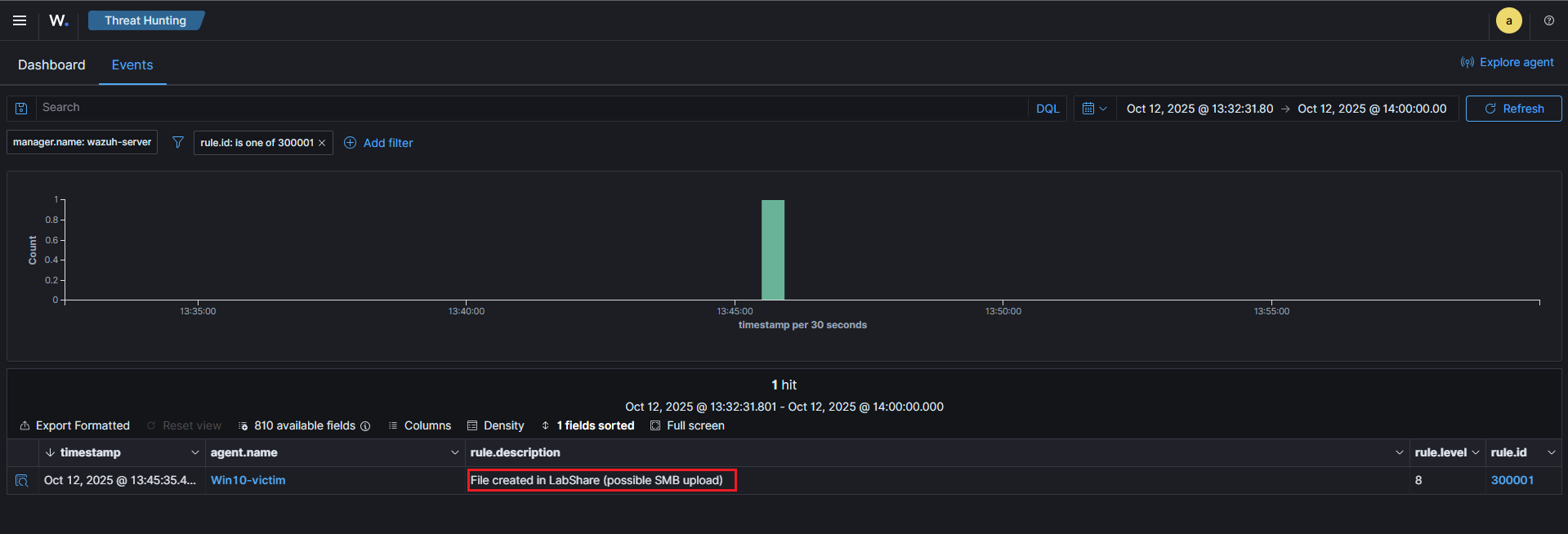
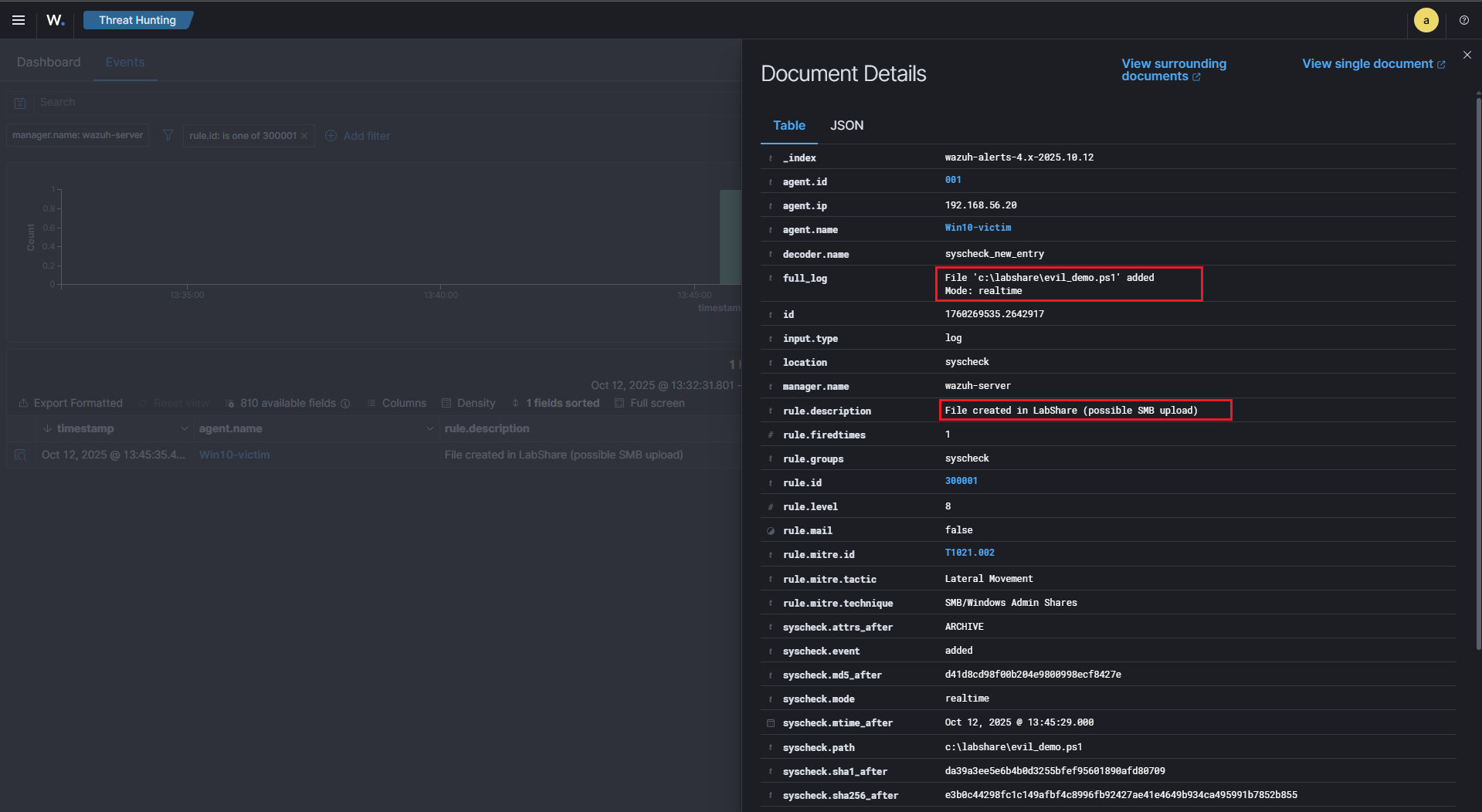
This is the trigger that launched the YARA wrapper AR on the agent.
2) YARA result (agent wrote an entry to active-responses.log that the manager decoded)
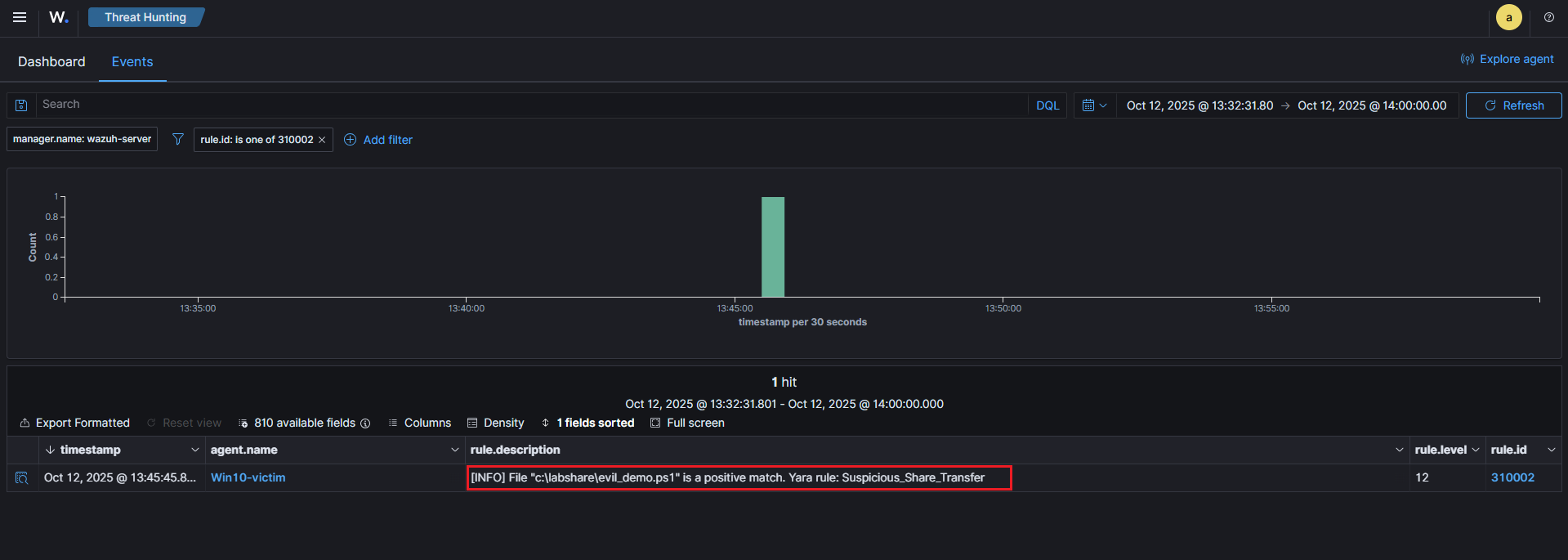
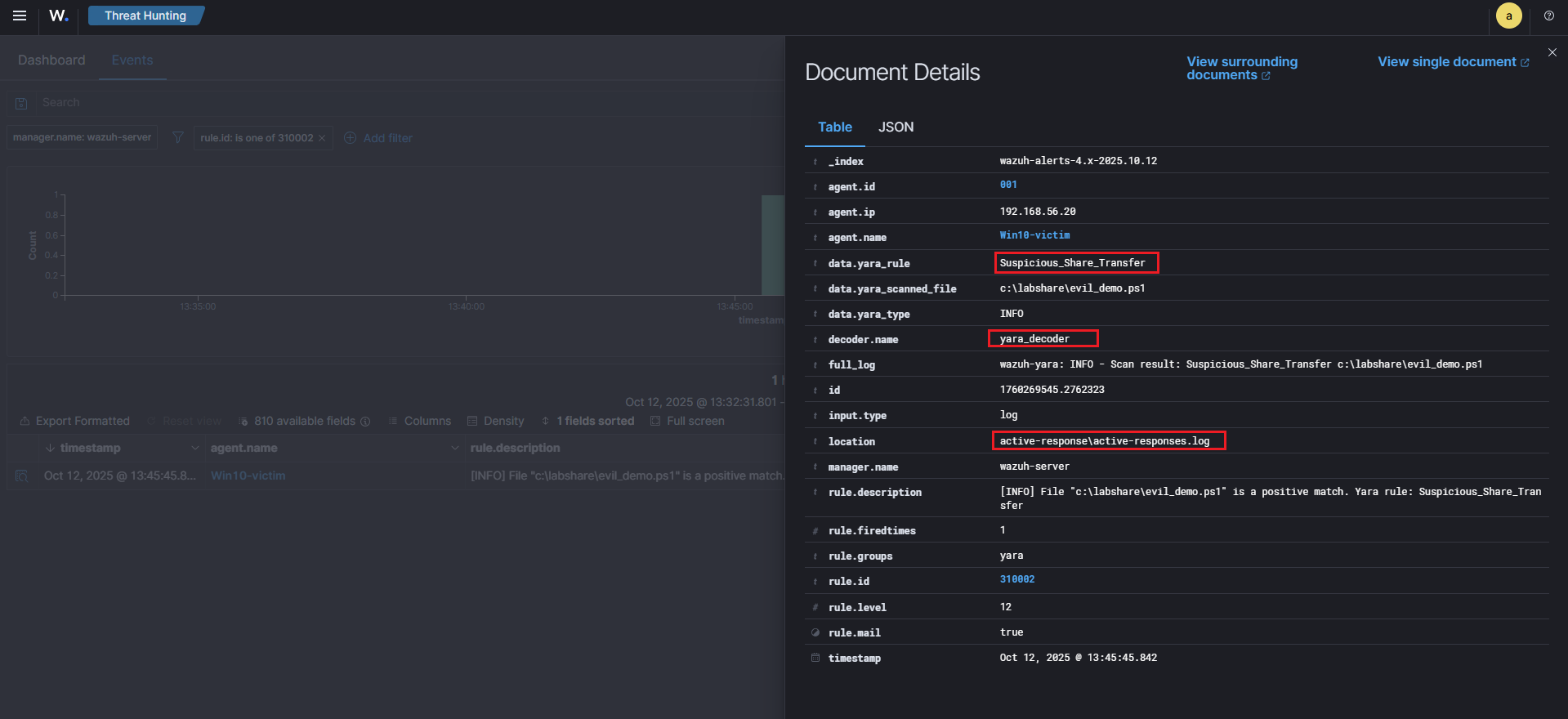
This proves the YARA wrapper scanned the file and matched Suspicious_Share_Transfer.
3) Containment AR confirmation (agent wrote AR log; manager raised an AR alert)
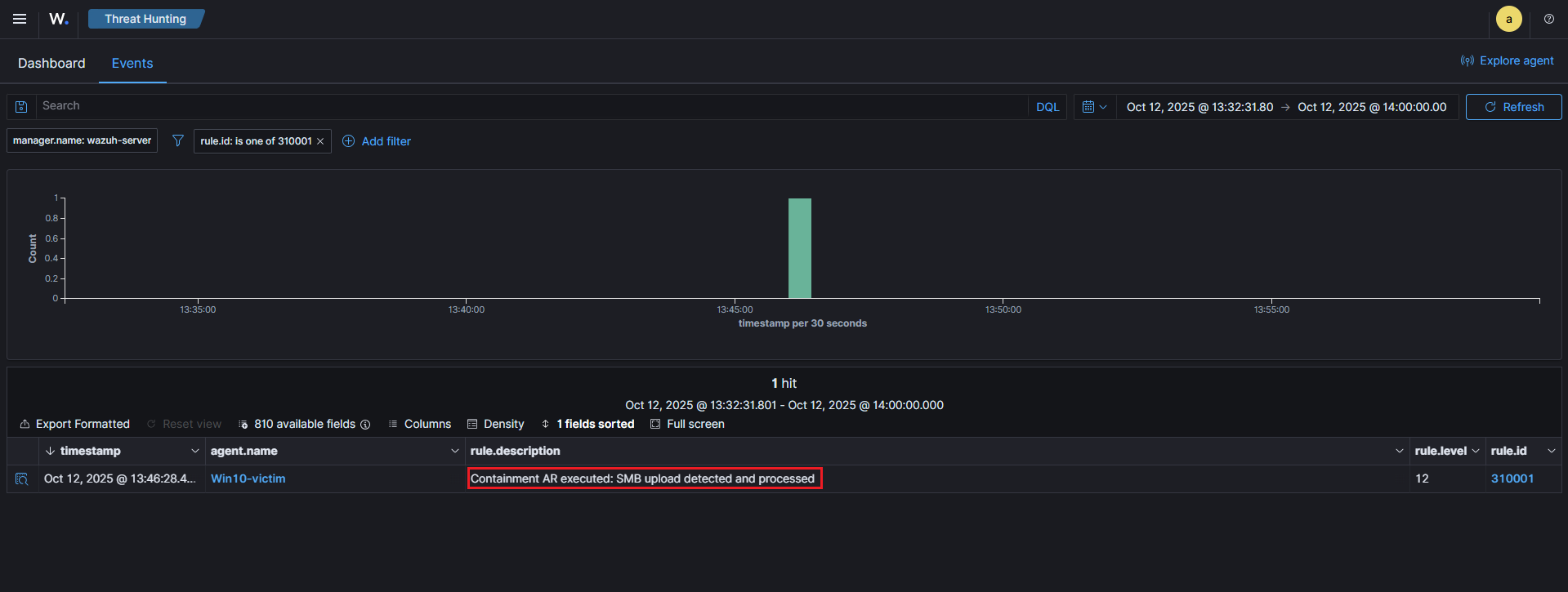
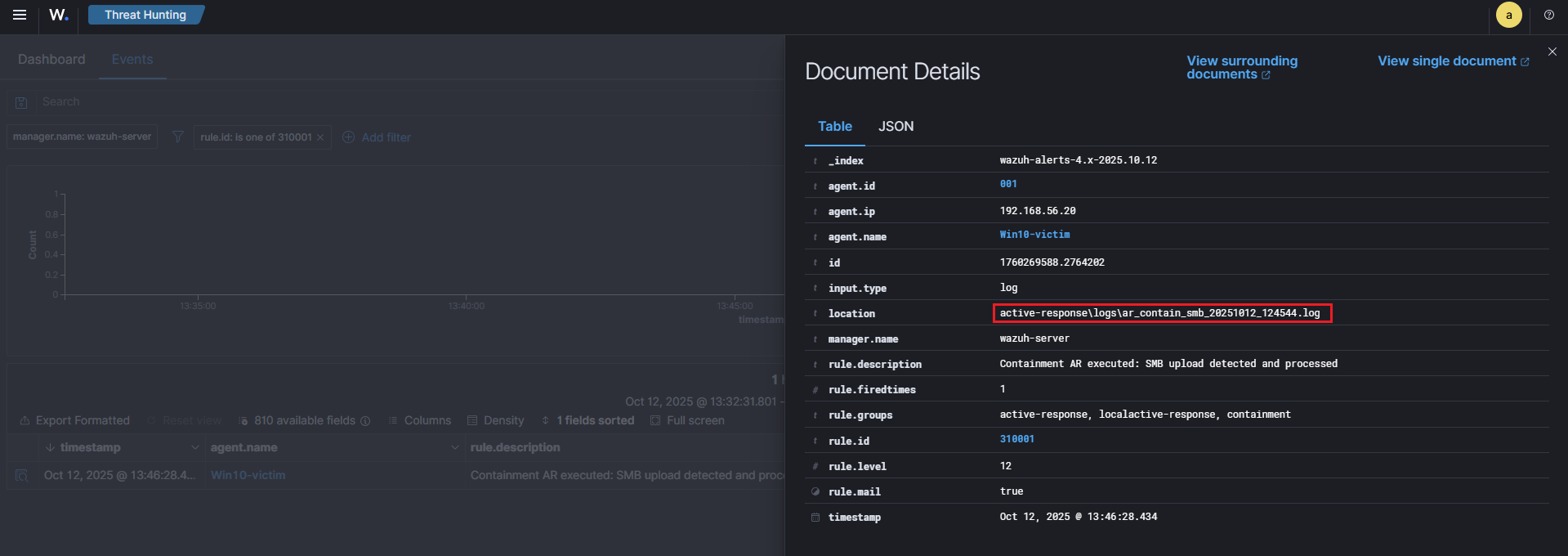
This confirms the agent performed the containment action (quarantined the file) and the manager indexed that log.
4) Checking log files
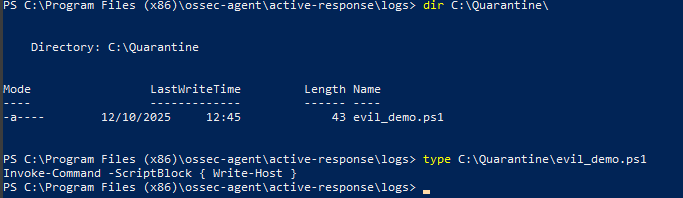
🧠 Purple Team Analysis
| Phase | Detail |
|---|---|
| Tactic | Lateral Movement |
| Technique | T1021.002 – SMB / Windows Admin Shares |
| Detection Source | Wazuh FIM (syscheck) + Agent-side YARA |
| Detection Logic | FIM detects new file in share → AR runs YARA → if YARA match → quarantine |
| Response | Move suspicious file to C:\Quarantine, create JSON |
| Outcome | Suspicious file removed from share; evidence captured for analysts |
| Confidence | High when YARA matches file content, moderate for FIM-only triggers |
| Evidence | FIM alert, YARA log entry, AR log & JSON summary |
| Recommendations | Harden SMB shares, restrict write access, tune YARA rules, deploy EDR |
💡 Lessons learned
- FIM is a great trigger for file-based techniques like T1021.002, but content scanning (YARA) improves confidence and reduces false positives.
- Keep YARA rules focused and test them: generic rules help for lab demos, but production rules should be carefully tuned.
- Active Response must be safe: quarantining is effective in a lab; in production, consider approvals or staggered actions (copy first, then quarantine) to avoid accidental outages.
- Preserve logs & artifacts: agent-side JSON summaries + human-readable logs make the AR traceable and auditable from the manager.
👀 What we could do next (improvements & extensions)
Even though detection and automated containment work well in this lab, there are several realistic enhancements that make the scenario richer and more production-like :
-
Harden and expand YARA rules : Add targeted signatures for obfuscated PowerShell (e.g.
-EncodedCommand, common obfuscation markers), known offensive frameworks, and high-risk script behaviors to reduce false positives and catch more stealthy uploads. -
Network + endpoint correlation : Correlate the FIM/Sysmon evidence with network detections (Suricata/Zeek alerts or SMB session logs). Multi-layer correlation improves confidence and reduces analyst investigation time.
-
Tighten SMB share permissions : Simulate more realistic file server hardening: restrict write access, use share-level ACLs, or create per-host shares. This both reduces noisy alerts in the lab and demonstrates real mitigation controls.
-
Quarantine workflow with analyst validation : Instead of immediately deleting/moving files, stage them for analyst review (e.g., move to a staging folder and flag in the SIEM). Add a manual approval step before permanent quarantine to avoid disrupting legitimate workflows.
-
Centralize artefacts for triage / SOAR integration : Automatically upload quarantined samples, logs, and JSON AR summaries to a central repo (or SOAR) for deeper analysis and to create repeatable playbooks.
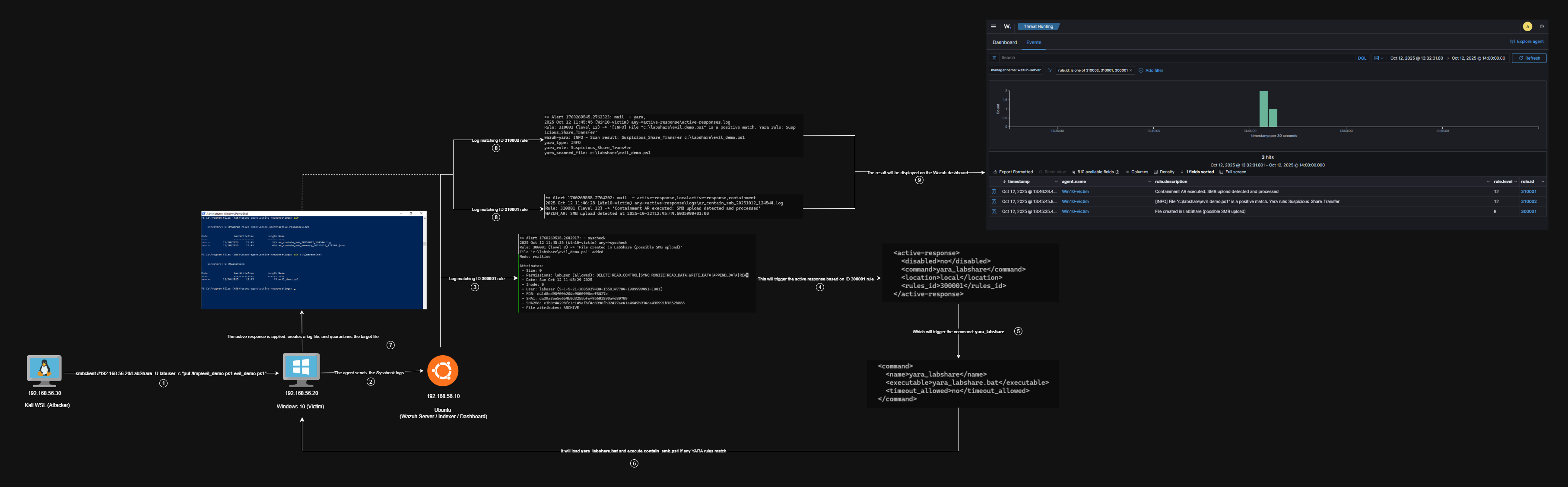
🧭 Summary Diagram
Here’s a visual recap of the workflow implemented in this scenario :
📚 References
| Reference | Link |
|---|---|
| Wazuh | wazuh.com |
| Wazuh x YARA | documentation.wazuh.com |
| MITRE ATT&CK (T1021.002) | attack.mitre.org (T1021.002) |
| YARA | virustotal.github.io |
| yara_labshare.bat | yara_labshare.bat |
| contain_smb.ps1 | contain_smb.ps1 |