Purple Team Lab – Detecting LSASS Credential Dumping with Wazuh
Building a realistic Purple Team scenario to detect and respond to LSASS credential dumping (T1003) using Wazuh and Active Response.
🧱 Overview
In this new Purple Team lab scenario, we focus on detecting and responding to credential dumping attempts via LSASS using Wazuh and Active Response.
🎯 MITRE ATT&CK Technique :
- T1003 – Credential Dumping (LSASS Access)
Objective : This technique describes how attackers attempt to extract credentials by accessing the Local Security Authority Subsystem Service (LSASS) memory.
Why it matters :
- LSASS contains secrets and password hashes, making it a prime target for post-exploitation.
- Attackers often use tools like Mimikatz to dump credentials.
- Early detection and containment prevent lateral movement and privilege escalation.
In this simulation, a user process attempts LSASS access. Wazuh detects this behavior via Sysmon Event ID 10 and automatically triggers an Active Response to kill malicious processes and disable the suspicious user account.
📊 What is Wazuh?
Wazuh is an open-source Security Information and Event Management (SIEM) platform that provides threat detection, incident response, and compliance monitoring across endpoints and cloud environments.
It collects logs from endpoints, detects suspicious activity using MITRE ATT&CK-aligned rules, and can automatically trigger Active Responses to contain threats.
In this lab, Wazuh acts as the central SIEM:
- Collecting logs from Windows Sysmon
- Detecting suspicious LSASS access (T1003)
- Executing response actions to contain potential credential dumping
🧠 Scenario Context
After gaining local access, an attacker might attempt to dump credentials :
1
C:\Users\labuser\Downloads\mimikatz.exe
The process accesses C:\Windows\system32\lsass.exe, triggering Sysmon Event ID 10. The Wazuh agent detects this via a high-confidence rule, based on :
- Accessing LSASS from user directories (
C:\Users\…) - Suspicious
GrantedAccessflags (e.g.,0x1010,0x1fffff)
🧱 Lab Architecture
Minimal lab topology: Kali (attacker) → Windows (victim, Wazuh agent) → Wazuh Manager (SIEM & Active Response).
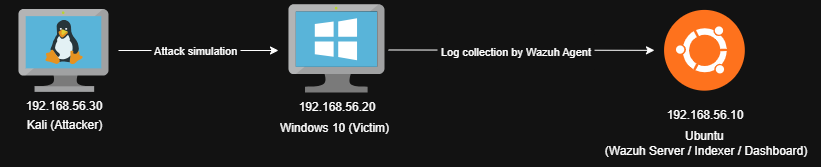
Logs collected from Windows :
- Sysmon Event Logs (Event ID 10 – Process Access)
- Optional Windows Security logs for auditing
⚔️ Attack Simulation
On the Windows 10 victim machine, the attacker runs :
1
C:\Users\labuser\Downloads\mimikatz.exe
And then dumps LSASS credentials :
1
2
mimikatz # privilege::debug
mimikatz # sekurlsa::logonpasswords
This execution will be log in the Sysmon (Event ID 10) :
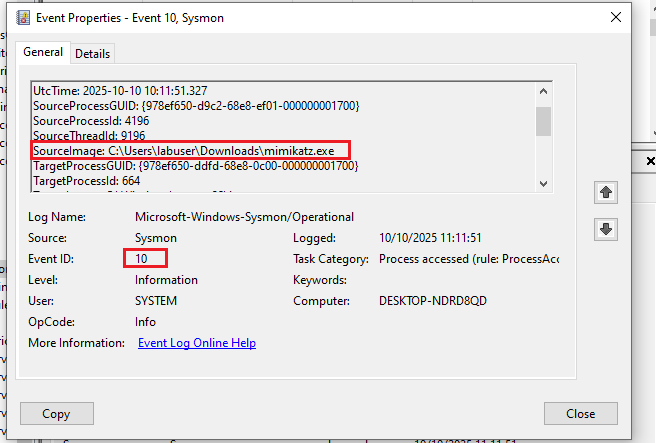
Wazuh detects the suspicious LSASS access and triggers the containment Active Response.
👁️ Detection Logic
To detect potential credential dumping attempts, we designed a layered detection approach using custom Wazuh rules.
The first rule (100100) identifies generic LSASS access (Sysmon Event ID 10) by matching any process that targets lsass.exe. This captures all instances of processes attempting to read LSASS memory, providing a broad detection baseline.`
File : /var/ossec/etc/rules/local_rules.xml
1
2
3
4
5
6
7
8
  <rule id="100100" level="14">
    <if_sid>92900</if_sid>
    <field name="win.system.eventID">10</field>
    <field name="win.eventdata.TargetImage" type="pcre2">(?i).*\\lsass\.exe$</field>
    <description>Suspicious LSASS access detected (possible credential dumping).</description>
    <group>credential_dumping,mitre_t1003,</group>
    <options>no_full_log</options>
  </rule>
The second, higher-confidence rule (100101) adds heuristics by focusing on suspicious access patterns :
- Processes running from user directories (
C:\Users\…) or temporary paths - Specific
GrantedAccessflags commonly used by credential dumping tools (0x1010,0x1fffff,0x1f0fff)
1
2
3
4
5
6
7
8
  <rule id="100101" level="15">
    <if_sid>100100</if_sid>
    <field name="win.eventdata.sourceImage" type="pcre2">(?i)^C:\\\\Users\\\\.*|^C:\\\\.*\\\\Temp|.*AppData\\\\Local\\\\Temp.*</field>
    <field name="win.eventdata.grantedAccess" type="pcre2">(?i)0x1fffff|0x1010|0x1f0fff</field>
    <description>High-confidence LSASS access from user path with suspicious GrantedAccess — likely credential dumping.</description>
    <group>credential_dumping_high,mitre_t1003,</group>
    <options>no_full_log</options>
  </rule>
This two-tiered methodology allows us to prioritize alerts with a higher likelihood of malicious activity while minimizing false positives.
🚨 Example Alert in the Wazuh Dashboard
Example Trigger of Rule 100100 :
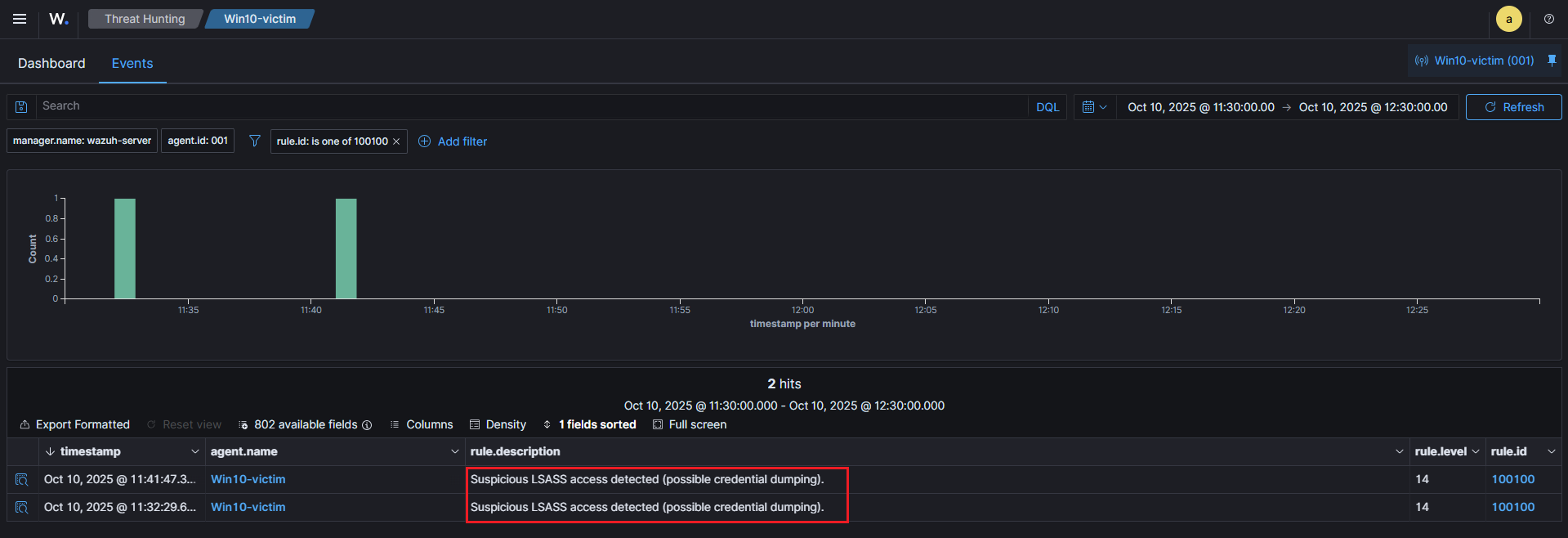
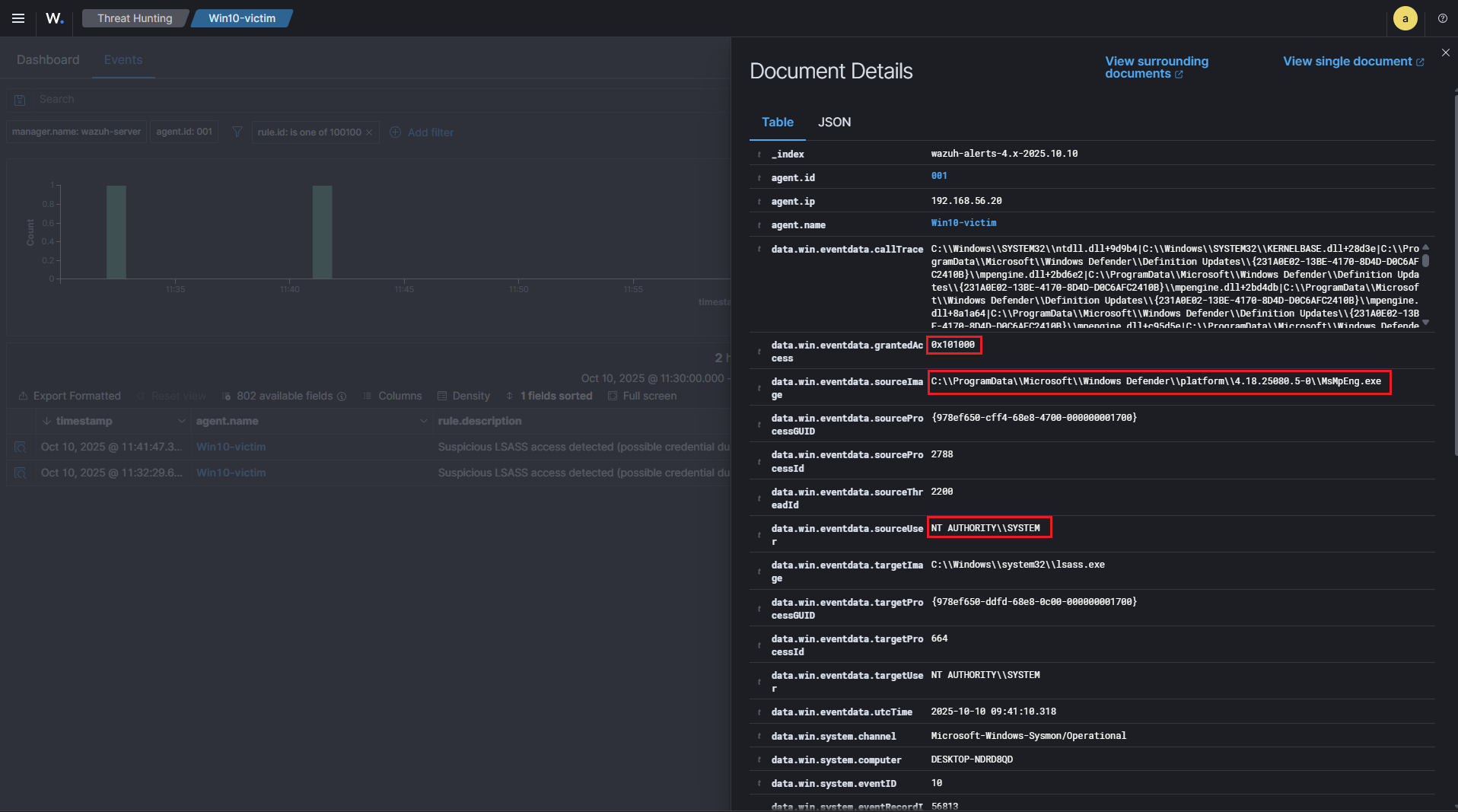
The alert above is an example of a trigger for rule 100100, which is our generic LSASS access detection. This rule flags any process attempting to access lsass.exe via Sysmon Event ID 10, providing a broad baseline for potential credential dumping activity.
In this particular case, the source process is :
C:\ProgramData\Microsoft\Windows Defender\platform\4.18.25080.5-0\MsMpEng.exe
and the source user is :
NT AUTHORITY\SYSTEM
This context shows that the access was performed by the legitimate Windows Defender service, not a malicious tool. Although the rule fired, this is expected system behavior, because Defender occasionally reads LSASS memory to scan for malware in protected processes.
Key points confirming this is not a true positive for credential dumping :
- Source Path : The process is running from a trusted system directory, not from user profiles or temporary directories, which are more suspicious (
100101rule focuses on those paths). - Source User : The access is done by
SYSTEM, a built-in Windows service account, not a regular user account. - No high-risk GrantedAccess : The
GrantedAccesshere is0x101000, which is less indicative of credential dumping compared to the values monitored by the high-confidence rule100101(0x1010,0x1fffff,0x1f0fff). - Known Process :
MsMpEng.exeis the main executable of Windows Defender, a legitimate security product.
This alert demonstrates how rule 100100 can trigger on benign system activity. It validates the importance of the secondary heuristic rule (100101), which filters out normal system operations and only flags high-confidence suspicious access, reducing false positives while keeping detection precise.
Example Trigger of Rule 100101 – High-Confidence Alert :
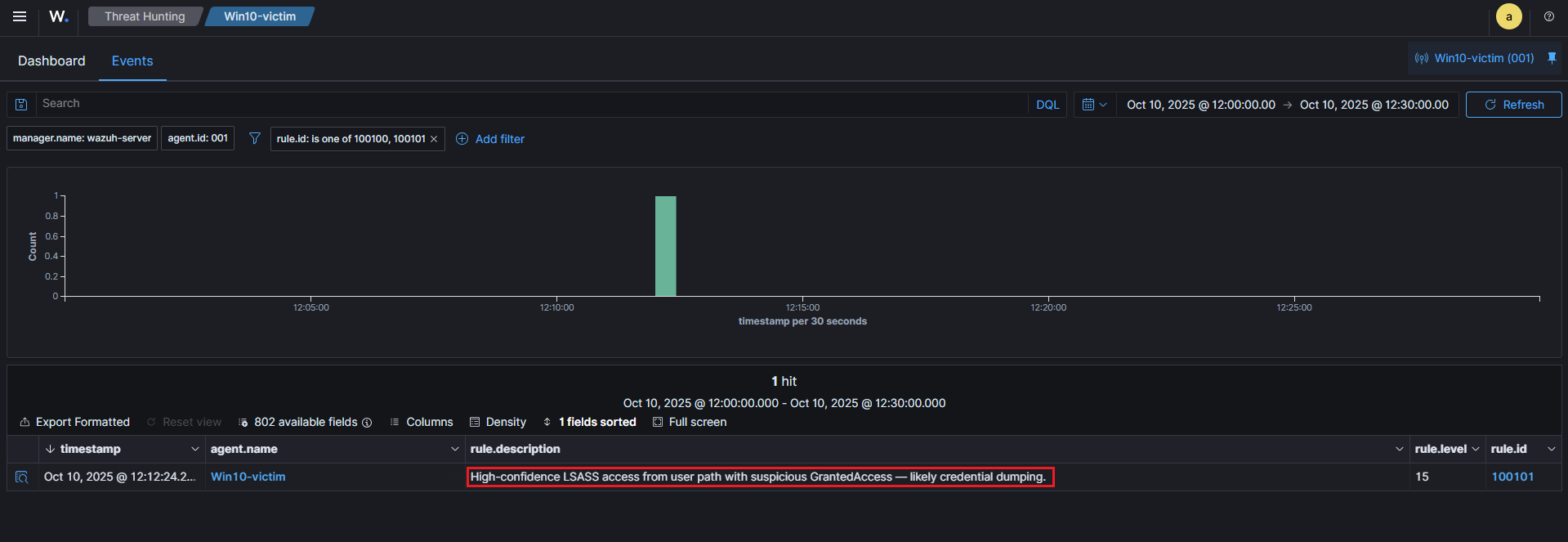
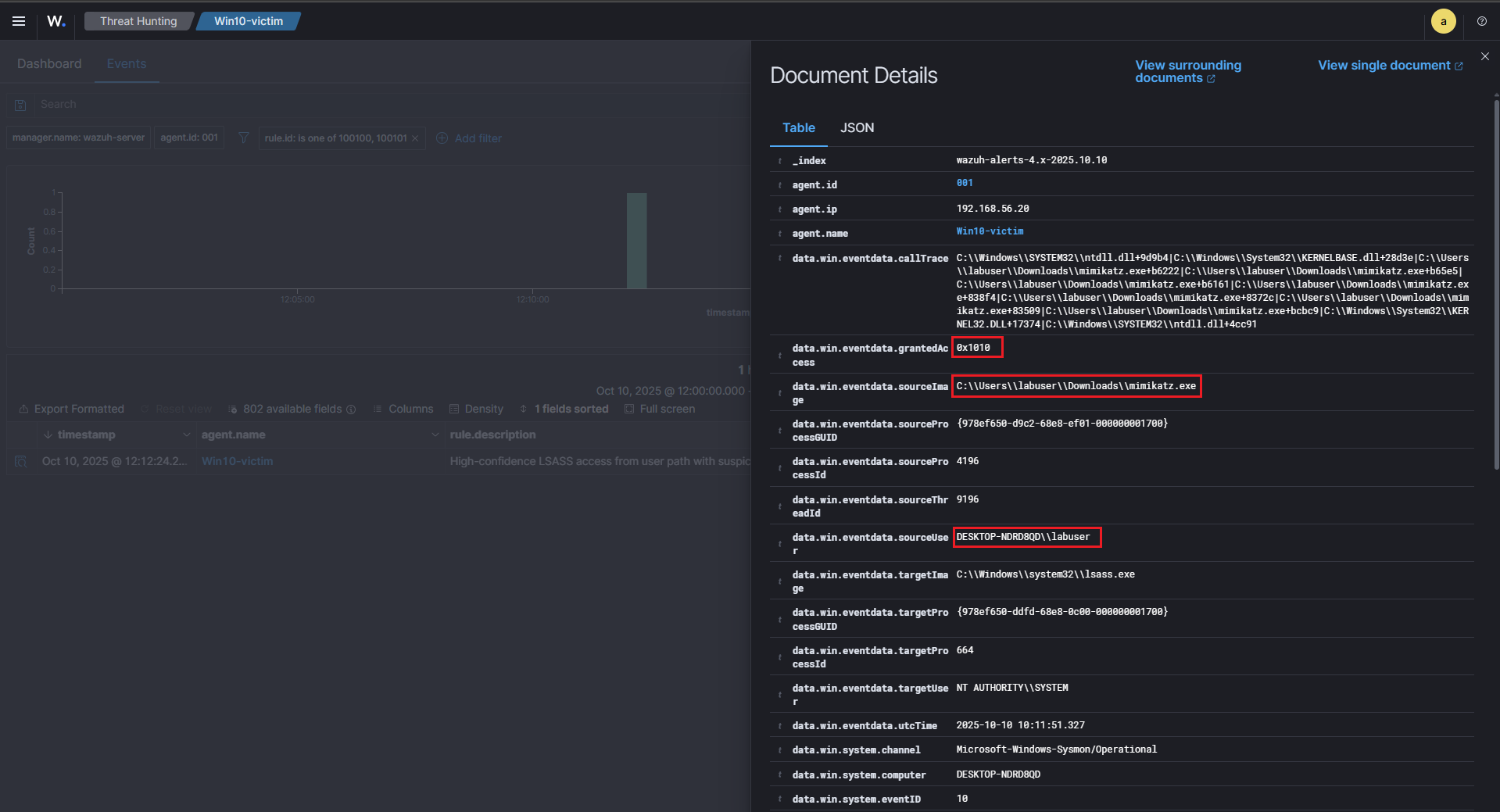
The alert above illustrates a high-confidence detection using rule 100101, which is specifically designed to catch likely credential dumping activity. Unlike the previous example where MsMpEng.exe triggered a benign 100100 alert, here the access is clearly suspicious.
Key indicators from this log :
- Source Path :
C:\Users\labuser\Downloads\mimikatz.exe, the process is running from a user Downloads folder, which is considered a high-risk path for malware execution. This matches the heuristic defined in100101to detect processes accessing LSASS from non-system locations. - Suspicious Process : The executable is
mimikatz.exe, a well-known credential dumping tool, frequently used by attackers to extract passwords from LSASS memory. - Source User :
DESKTOP-NDRD8QD\labuser, this is a regular user account, not a system service. Any LSASS access from a non-system account is highly suspicious and aligns with MITRE ATT&CK T1003. - GrantedAccess : The
GrantedAccesshere is0x1010, this value corresponds to a privileged memory read, which is consistent with credential dumping attempts. Rule100101monitors such access flags to increase confidence in detection.
The combination of user path, suspicious process, non-system user, and high-risk access flags causes 100101 to fire at level 15, indicating a real potential attack.
This alert contrasts sharply with the benign 100100 trigger from Windows Defender, showing how multi-tiered rules help reduce false positives while catching true threats.
This log would trigger the Active Response (contain_lsass), which disables the offending user account dynamically, helping contain the credential dumping attempt immediately.
⚙️ Active Response – Containment
Once a high-confidence alert is triggered, Wazuh automatically executes an Active Response (AR) to contain the threat.
The AR is configured via ossec.conf to run the contain_lsass command, which calls our wrapper batch script that executes a PowerShell containment script as SYSTEM.
This approach allows the agent to :
- Kill known malicious processes (e.g., Mimikatz)
- Disable the suspicious user account dynamically
Importantly, network isolation is intentionally skipped to ensure the agent can continue reporting to the Wazuh manager.
File : /var/ossec/etc/ossec.conf
Script executed: contain_lsass.ps1 via wrapper .bat in ossec.conf.
Command section :
1
2
3
4
5
 <command>
    <name>contain_lsass</name>
    <executable>contain_lsass.bat</executable>
    <timeout_allowed>no</timeout_allowed>
  </command>
Active Response section :
1
2
3
4
5
6
 <active-response>
    <disabled>no</disabled>
    <command>contain_lsass</command>
    <location>local</location>
    <rules_id>100101</rules_id>
  </active-response>
Script Highlights
The PowerShell script contain_lsass.ps1 is responsible for :
- Collecting recent Sysmon EventID 10 to identify LSASS access attempts.
- Terminating suspicious processes matching known credential dumping tools.
- Skipping network isolation, preserving agent communication.
- Disabling user accounts dynamically based on the Sysmon
SourceUserfield. - Generating logs and JSON summaries for traceability and audit purposes.
This approach ensures rapid containment of credential dumping attempts while maintaining visibility and audit trails, minimizing operational disruption on the endpoint.
This is the contain_lsass.ps1 script used in this home lab.
✅ Validation
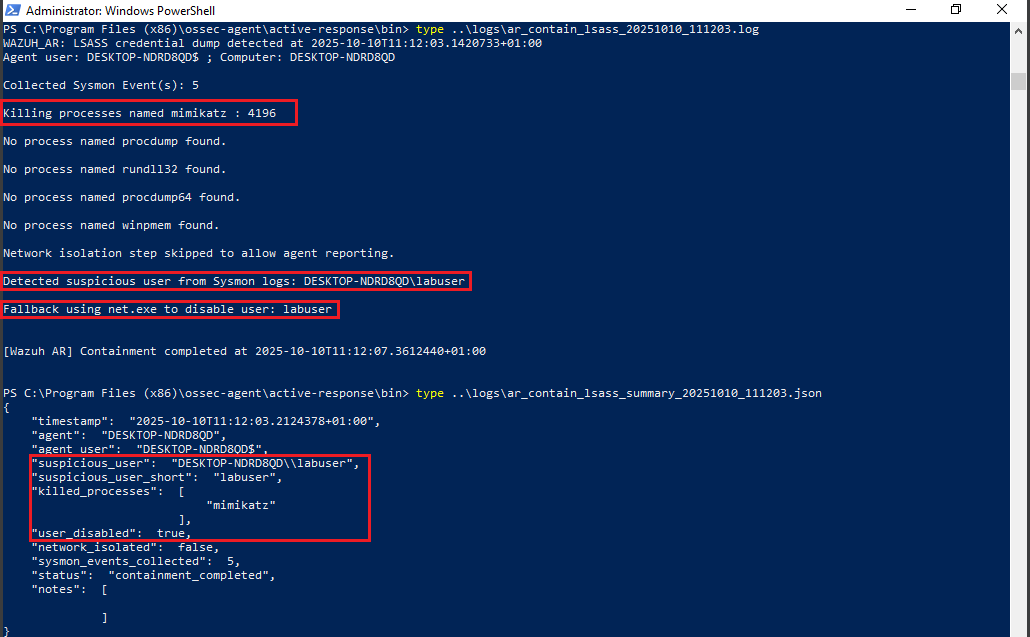
The containment was confirmed by correlating three independent sources of evidence: the Wazuh detection alert (rule 100101), the agent-side Active Response artefacts (log + JSON), and the raw Sysmon snapshot that triggered the rule.
Detection → Active Response trigger :
-
The Sysmon EventID 10 (process access) matching our high-confidence rule (
100101) raised the initial alert in Wazuh (id:100101). This indicates a suspicious process (e.g.C:\Users\labuser\Downloads\mimikatz.exe) attempted to access lsass.exe with a dangerousGrantedAccessflag. -
Because
100101is configured to call the contain_lsass active-response command in ossec.conf, the manager instructed the agent to run the containment wrapper (contain_lsass.bat → contain_lsass.ps1).
User account before AR :
1
2
net user labuser
# Account active: Yes
Trigger AR via Wazuh alert (100101) :
1
2
3
C:\Users\labuser\Downloads\mimikatz.exe
mimikatz # privilege::debug
mimikatz # sekurlsa::logonpasswords
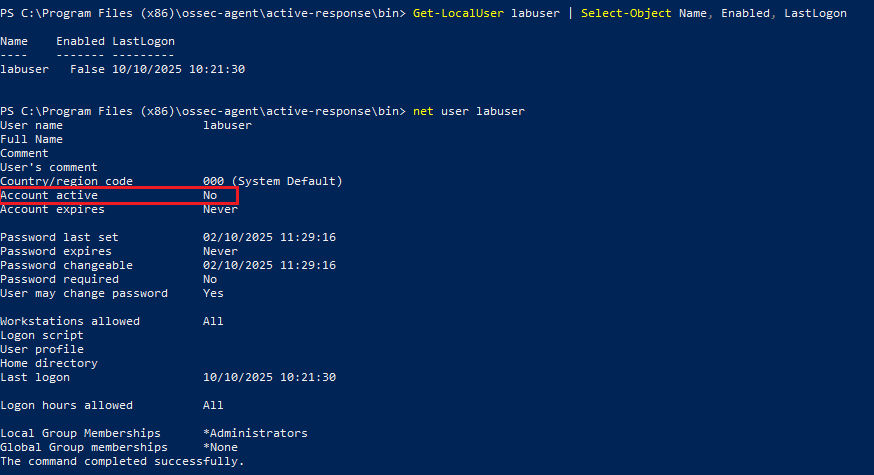
User account after AR :
1
2
net user labuser
# Account active: No
Agent-side proof of containment (logs + JSON) :
We can confirm the containment by inspecting the agent-side Active Response artifacts and the Sysmon evidence: check the human-readable AR log (ar_contain_lsass_YYYYMMDD_HHMMSS.log), the JSON summary (ar_contain_lsass_summary_YYYYMMDD_HHMMSS.json), and the captured Sysmon snapshot file. These files prove which processes were terminated, which user was identified/disabled, and which Sysmon events triggered the rule. You can also verify the Wazuh alert in the dashboard (alert 100101) and confirm the user account state with net user :
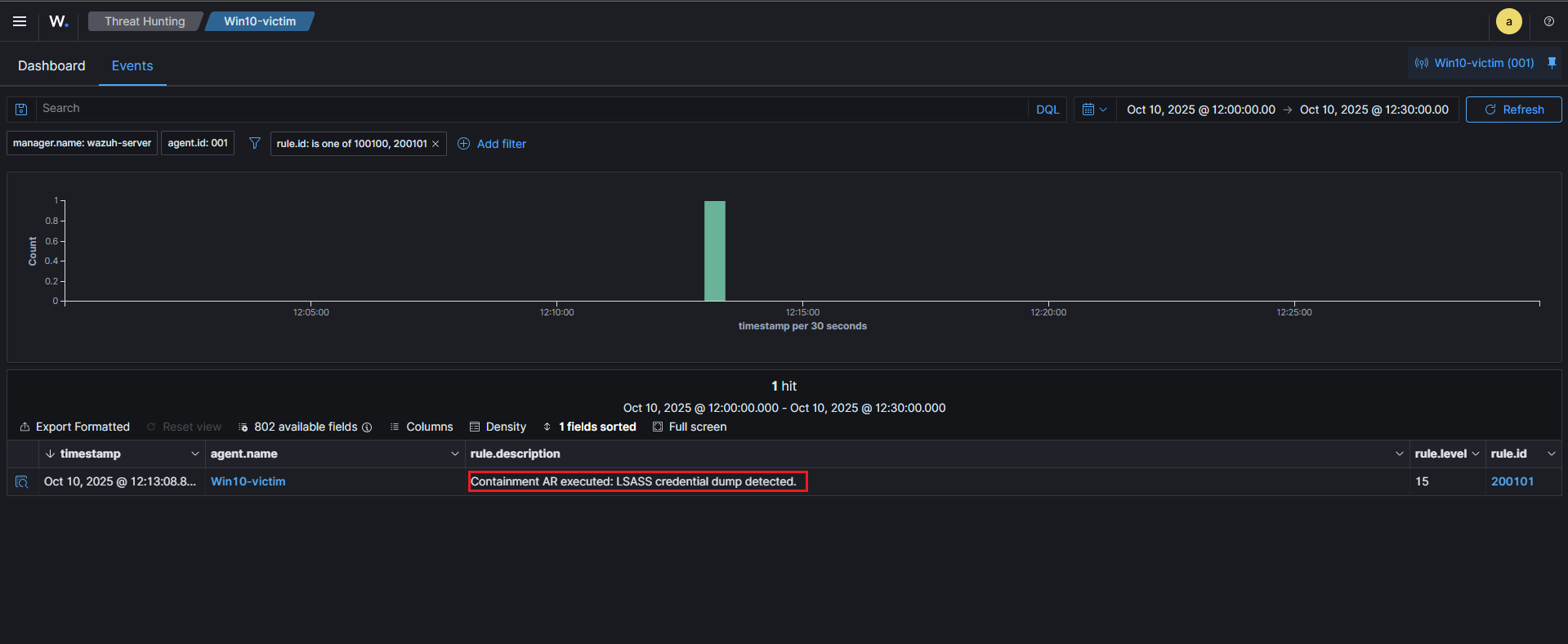
Wazuh dashboard correlation (alert 200101) :
- We created a logging rule (
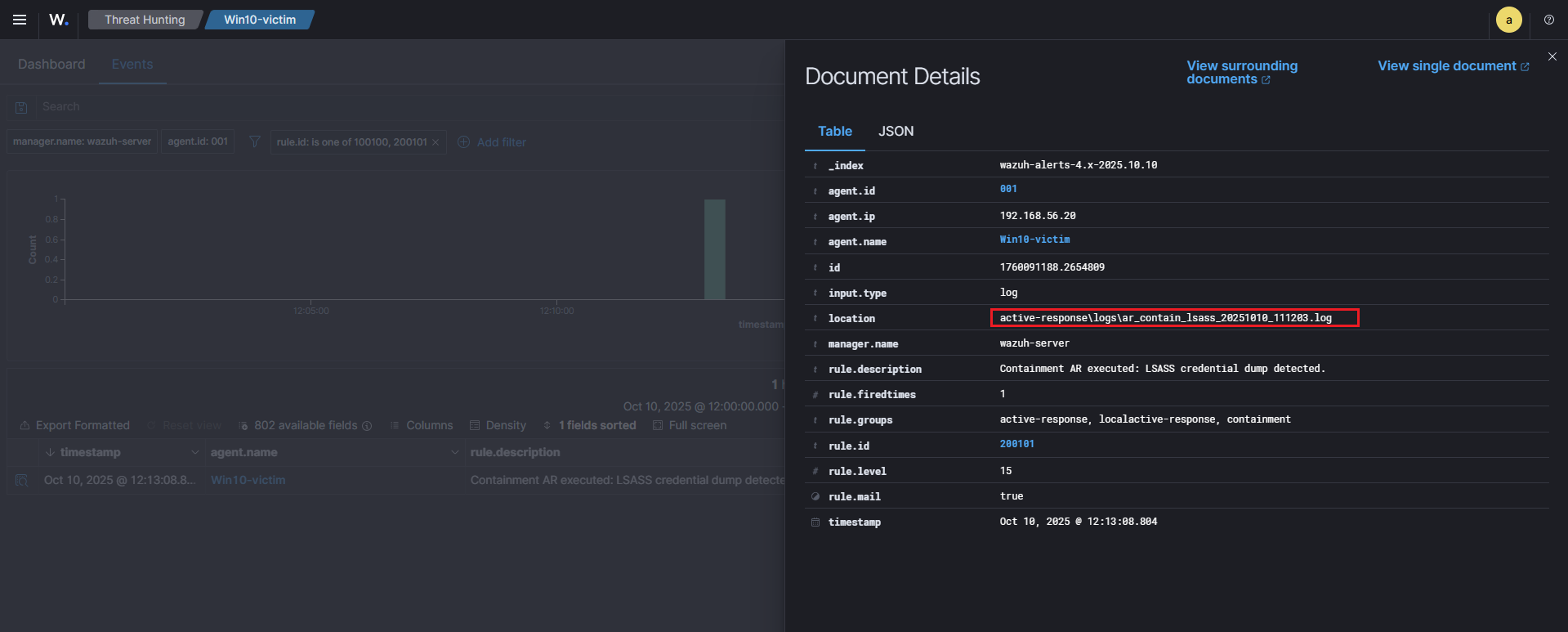
200101) that matches the AR log marker (WAZUH_AR: LSASS credential dump detected). When the agent writes the AR log, the manager ingests it and raises alert200101(Active Response executed). - The Wazuh dashboard, the alert document shows the
locationfield pointing to the agent-side log path (for example:active-response\logs\ar_contain_lsass_20251010_111203.log). This is the definitive link proving the AR actually ran on the endpoint.
File : /var/ossec/etc/rules/local_rules.xml
1
2
3
4
5
6
  <rule id="200101" level="15">
    <match>WAZUH_AR: LSASS credential dump detected</match>
    <description>Containment AR executed: LSASS credential dump detected.</description>
    <options>no_full_log</options>
    <group>active-response,containment</group>
  </rule>
🧠 Purple Team Analysis
| Phase | Detail |
|---|---|
| Tactic | Credential Access (MITRE ATT&CK) |
| Attack Technique | T1003 – LSASS Credential Dumping |
| Detection Source | Sysmon EventID 10 |
| Detection Logic | Regex match on LSASS access from user paths + suspicious GrantedAccess |
| Response | Kill processes + disable suspicious user via Active Response |
| Outcome | Attack contained, compromised user locked |
| Confidence | High — matches known credential dumping tools |
| Evidence | Alerts, logs, JSON summary, Sysmon snapshots |
| Recommendations | Enforce LSA protection, AppLocker, EDR, tune rules |
💡 Lessons Learned
- Sysmon EventID 10 is crucial to detect LSASS access attempts.
- Custom Wazuh rules allow fine-tuned detection aligned to MITRE T1003.
- Active Response enables immediate containment without disrupting agent reporting.
📘 Next Steps
We’ve already completed the first scenario: T1059 – PowerShell Execution (IEX) (PowerShell IEX detection & firewall containment). The second scenario (this article) focused on T1003 – LSASS credential dumping and automated containment with Wazuh.
Upcoming labs
The next scenario in the series will be:
- 🔁 T1021.002 – SMB / Windows Admin Shares (Lateral Movement via SMB) — planned next.
Why this ? It naturally extends the chain from code execution → credential access to lateral movement, demonstrating detection of SMB/file uploads, endpoint + network correlation, and an Active Response workflow (quarantine/delete uploaded file, revoke SMB sessions or disable compromised accounts).
Future topics after T1021.002:
- ⚙️ T1047 – WMI Execution (remote execution via WMI / detection of WMI activity)
- 🧩 T1562 – Defense Evasion (tampering with agents/services, disabling security controls)
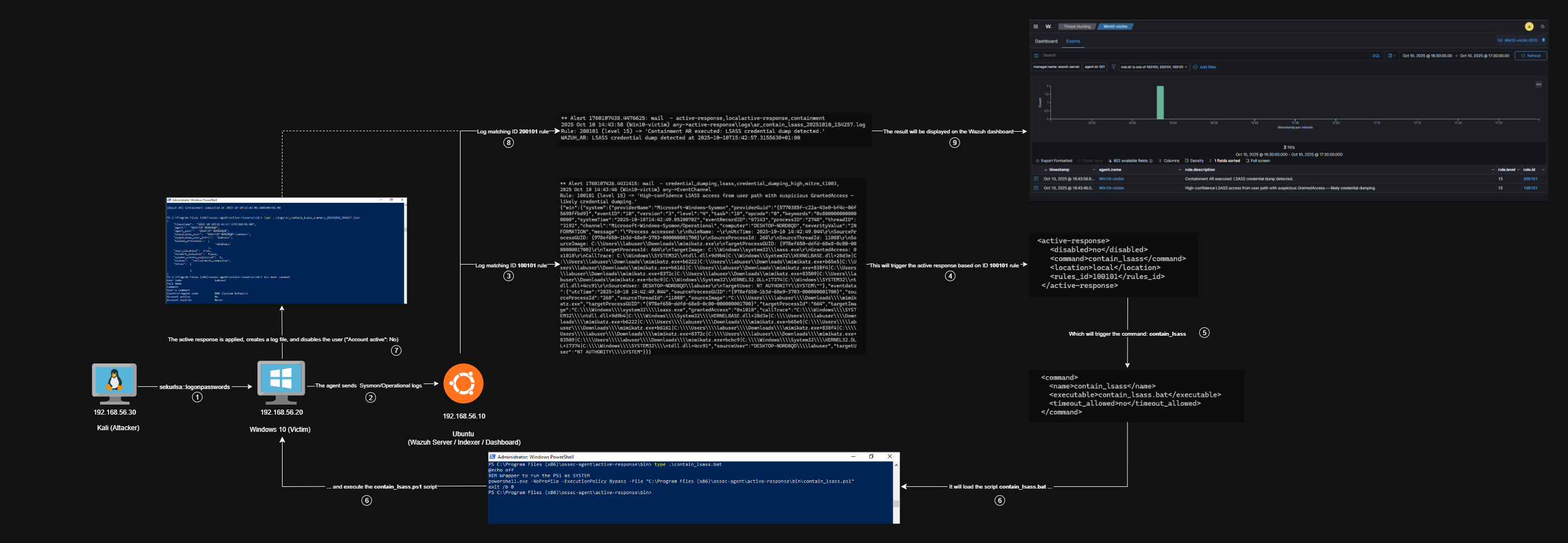
🧭 Summary Diagram
Here’s a visual recap of the workflow implemented in this scenario:
📚 References
| Reference | Link |
|---|---|
| Wazuh | wazuh.com |
| MITRE ATT&CK (T1003) | attack.mitre.org (T1003) |